Watch Prices
Price alerts watch a flight or hotel price for you and let you know when it drops.
Set up an alert
- Choose Alerts in the website menu, or the Alerts tab in the app.
- Choose New alert.
- Pick what to watch:
- Flights: one way, round trip or multi-city, with a few days either side if your dates can move.
- Hotels: a city, your dates and a hotel class.
- Set your target price and save.
You can also start one when you create a flying trip: tick Yes, watch prices for this trip.
Reading an alert
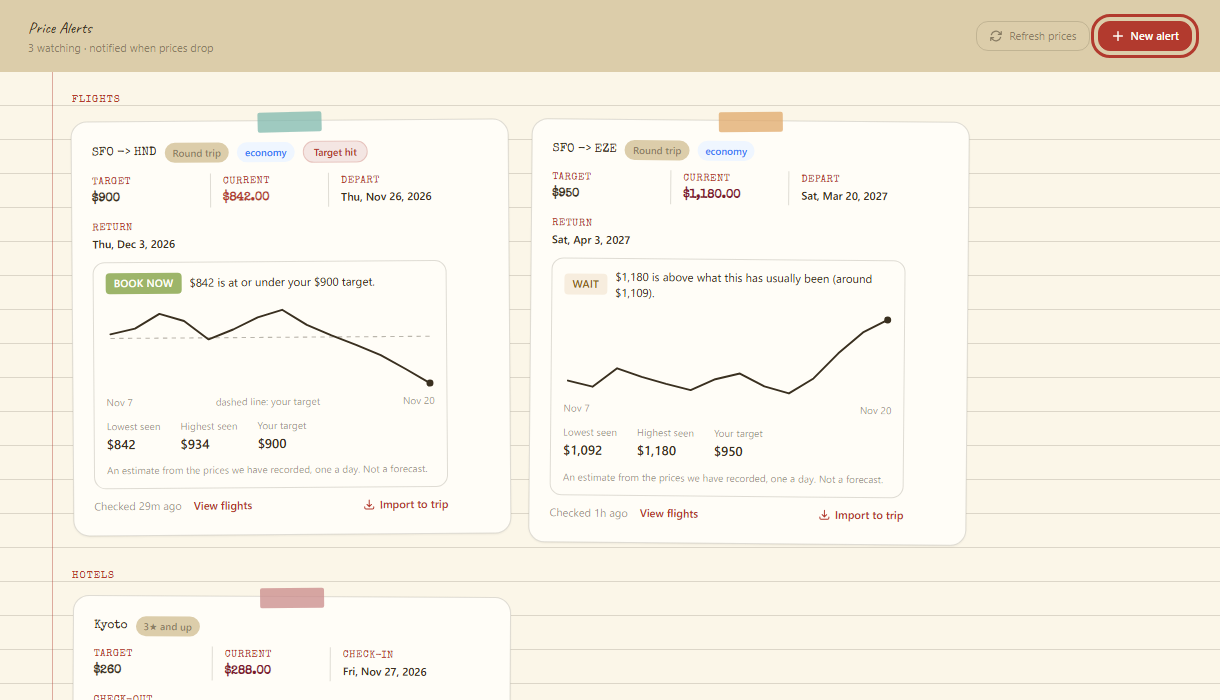
Each alert shows your target, the current price, its price history and when it was last checked. Refresh prices checks every watched price now.
Book or wait (Pro)
On a watched fare, Pro shows a book-or-wait signal: Book now when the price is at or under your target, the lowest we've seen, or your trip is under three weeks away; Wait when it's above what it has usually been; Typical price in between; and Still learning until we've seen enough prices. It's an estimate from the prices we've recorded, not a forecast. Free members see that a signal exists on the fare.
The Free limit
Free includes 2 active price alerts. If you have more, the alerts for your soonest trips keep running and the others pause; they're not deleted. Remove an alert to make room, or go Pro to watch as many as you like. An alert on a trip whose organizer has Pro never pauses and doesn't count toward your 2.